Overview
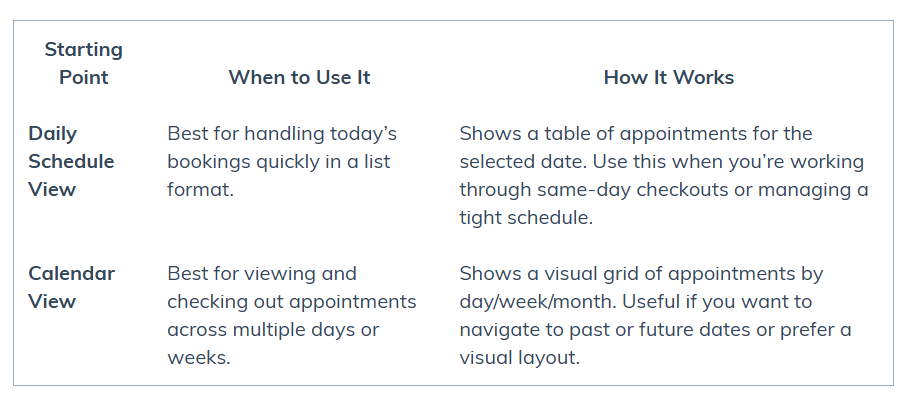
You can checkout and close appointments in Punchey using two different starting points. Both methods take you to the same invoice and payment process — the difference is how you get there.
Which Method Should I Use?
Step-by-Step Guides
Checkout & Close Appointments – Daily Schedule View
Start from the list of upcoming appointments for the day, open the action menu, and generate the bill.Checkout & Close Appointments – Calendar View
Start from the visual calendar, click the appointment block, and generate the bill from the pop-up.
Tip
Whichever method you use, you’ll end up at the same Invoice screen, where you can review details, accept payment, email the invoice, or save it for later.
Was this article helpful?
That’s Great!
Thank you for your feedback
Sorry! We couldn't be helpful
Thank you for your feedback
Feedback sent
We appreciate your effort and will try to fix the article