Overview
Punchey allows you to easily apply discounts to invoices for special customers before processing payment. Discounts can be added directly to an invoice, helping businesses provide promotions, loyalty pricing, employee discounts, or custom pricing adjustments when needed.
Once the discount is applied, the updated total will automatically reflect during checkout.
Why Is This Important?
Adding discounts to invoices helps your business:
Provide special pricing for loyal or VIP customers
Apply promotional or seasonal discounts
Adjust pricing before payment collection
Improve customer satisfaction and flexibility
Keep discounts properly documented within invoices
Creating an Invoice with a Discount
Follow these steps to create an invoice and apply a discount:
From the dashboard, navigate to:
Checkout > InvoicesSelect Create New Invoice
Enter the customer details and add the services or items to the invoice
Locate the Discount section on the invoice screen
Enter the discount amount or percentage for the customer
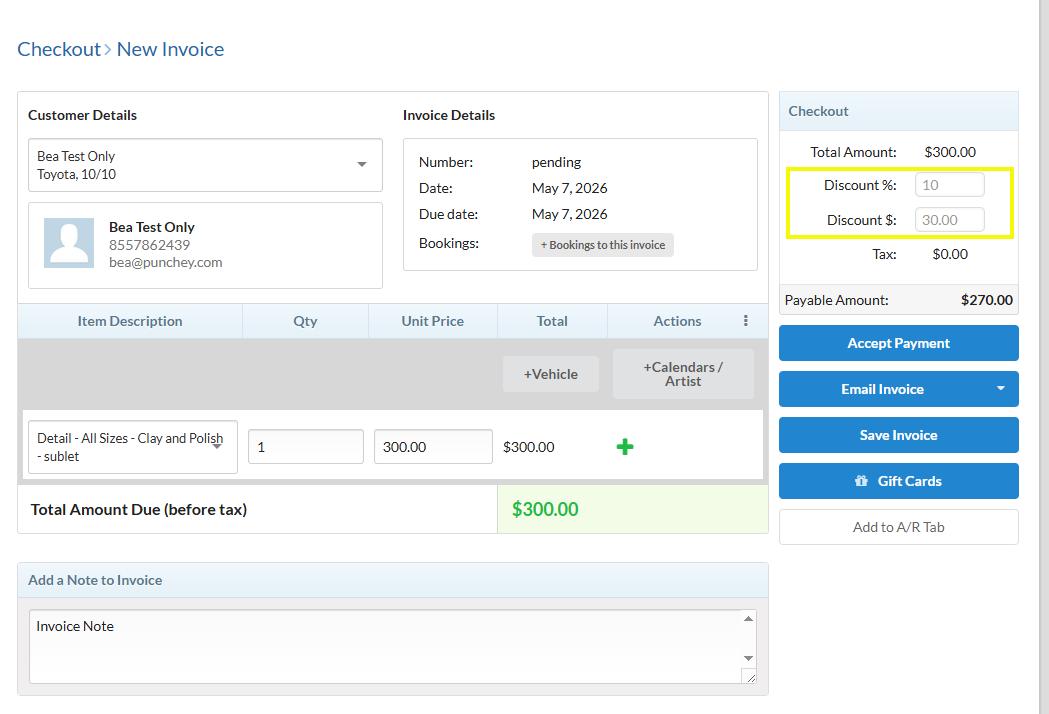
Review the updated invoice total
Select Accept Payment
Process the payment using the customer’s preferred payment method
The discounted invoice has now been successfully processed.
Was this article helpful?
That’s Great!
Thank you for your feedback
Sorry! We couldn't be helpful
Thank you for your feedback
Feedback sent
We appreciate your effort and will try to fix the article