Create beautifully branded invoices, work orders or any other form to print or convert to a PDF document.
Have your programmer (or ours) create a custom template that pulls any data in your system into a printable or PDFable document. Incorporate your brand or unique workflows into invoices or internal work-orders for you team. This uses HTML/ Django template language. Read more here.
Learn how
- First.. We recommend having a programmer from the Punchey team or your own help you with this.
- The code gets inserted here on your Software Setup section of your system. Your template system is built on HTML and Django template language. https://docs.djangoproject.com/en/3.0/ref/templates/language/
- Example Code: Here is an example of this code for a branded work order for a auto repair business.
Output
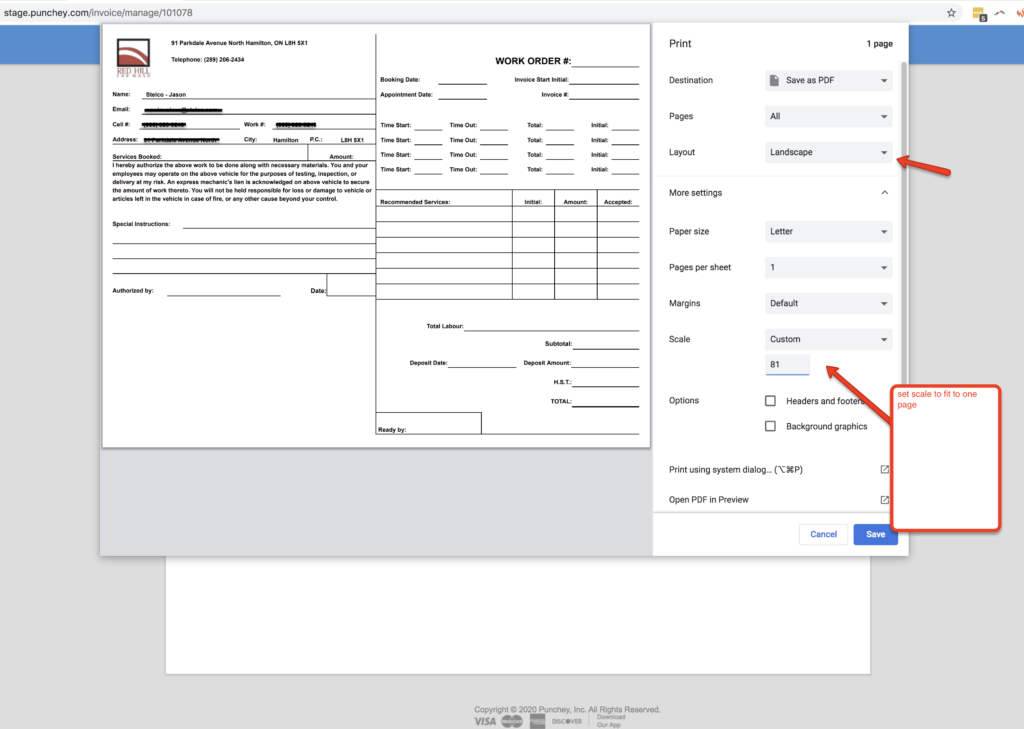
Once you have your custom printable form, navigate to your invoice view page and press “Custom PRINT” underneath the normal print invoice button.
Feel free to modify your print settings in your browser: Layout, margins and scale for example.
Click to view full:

Want to learn more? Check out our YouTube Channel for helpful content and read more of our how-to guides!
Was this article helpful?
That’s Great!
Thank you for your feedback
Sorry! We couldn't be helpful
Thank you for your feedback
Feedback sent
We appreciate your effort and will try to fix the article