Overview
Keeping your password updated helps protect your user account and personal information from unauthorized access. Regularly changing your password is a simple but important step in maintaining your account security.
Why Changing Your Password Matters
Your password is the first line of defense for your user account. Updating it regularly can help:
Protect sensitive account information
Prevent unauthorized access
Improve overall account security
Reduce the risk of compromised credentials
For the best security, use a strong password that includes a mix of uppercase and lowercase letters, numbers, and special characters.
You can update your password anytime through your Account Settings. The process only takes a few moments and can be completed directly from your user profile menu.
Steps to Change Your Password
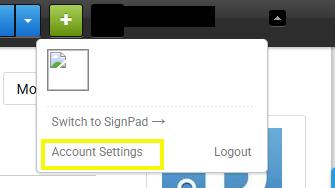
Navigate to the dropdown arrow next to your name at the top right of the page.
Select Account Settings.
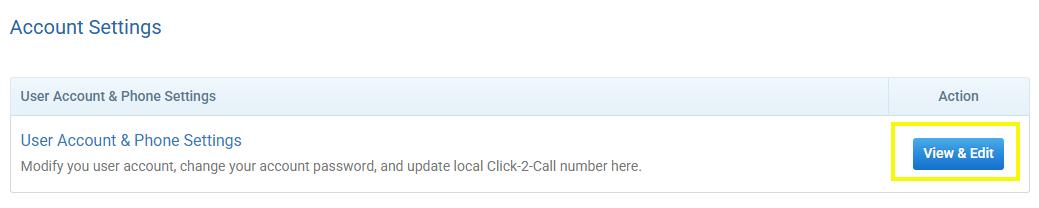
Select User Account & Phone Settings.
Scroll to the bottom of the page to find the section for creating a new password.
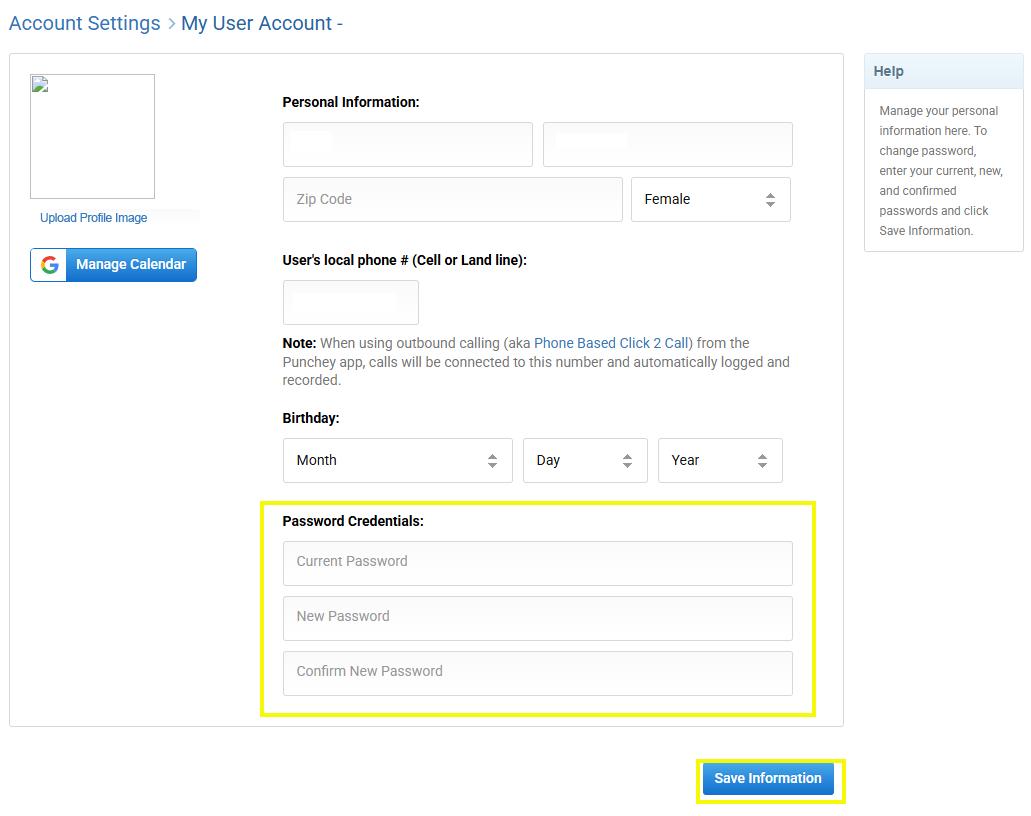
Enter your new password and save your changes.
Once your password has been updated successfully, use your new password the next time you sign in to your user account.
Was this article helpful?
That’s Great!
Thank you for your feedback
Sorry! We couldn't be helpful
Thank you for your feedback
Feedback sent
We appreciate your effort and will try to fix the article